


Smart Home: The Beginner's Guide

Here's a stat that made me put my phone down: the average American household now has over 20 connected devices. Twenty. Not some Silicon Valley smart mansion. Just a regular home with a couple smart speakers, a streaming stick, a robot vacuum, and a handful of smart bulbs. So if you've been wondering what does smart home setup guide mean, you're asking the right question at a pretty good time.
Short answer? It's a structured plan for turning your house or apartment into a home that responds to your voice, adjusts to your habits, and handles boring repetitive tasks without you lifting a finger. The longer, more honest answer involves choices about ecosystems, device compatibility, network security, and yes, the electromagnetic frequencies all these gadgets pump into your living space.
I've watched friends blow hundreds of dollars on smart gadgets that ended up in a junk drawer because nothing worked together. That's the real problem a smart home setup guide solves. It's a roadmap. It keeps you from buying a $200 smart lock that can't talk to your $150 smart speaker.
The global smart home market is on track to hit $338.28 billion by 2030, according to Grand View Research. That's not hype. That's an entire industry reshaping how we live indoors. Whether you want to save on energy bills, beef up your home security, or just turn off the lights without getting out of bed, this guide will get you there without the usual headaches.
So let's walk through everything, from picking your first ecosystem to automating your morning routine to keeping your data safe from hackers.
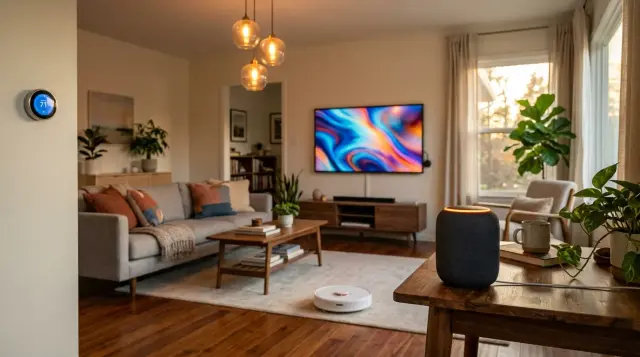
A smart home isn't a collection of expensive gadgets that respond to your voice. It's a system, a connected ecosystem where every device works with every other device to make your daily life a little easier, a little safer, and a lot more efficient.
What Does Smart Home Setup Guide Mean, Really?
When people search "what does smart home setup guide mean," they're almost never looking for a dictionary definition. They want to know what's actually involved in making their home smarter. Fair enough. A smart home guide is basically a blueprint that covers four things: choosing a platform (like Alexa, Google, or Apple), picking devices that work on that platform, connecting and configuring them, and then building automations that make your life easier.
Think of it like setting up a new phone. You pick iOS or Android first. Then you choose your apps. Then you customize settings. A home automation guide follows the same logic, just with physical hardware scattered around your house instead of apps on a screen.
What separates a good guide from a mediocre one is specificity. Anyone can tell you to "buy a smart speaker." A useful guide tells you which speaker works with which ecosystem, why that matters for your budget, and what to do when the thing refuses to connect to your Wi-Fi at 2 AM. If you're interested in how connected devices interact on a broader level, I'd recommend reading The Connected Home: The Honest Guide for a deeper look.
Quick Q&A
Q: Do I need to be tech-savvy to set up a smart home?
A: No. Most modern smart devices use plug-and-play apps that walk you through setup in under 10 minutes per device.
The key idea here is that a smart home setup guide isn't a product. It's a strategy. Without one, you'll end up with a pile of gadgets that don't play nice together.
Which Smart Home Ecosystem Should You Choose in 2025?
This is the first real decision you'll make, and probably the most important. Your ecosystem is the brain of your smart home. The three big players are Amazon Alexa, Google Home, and Apple HomeKit. Each has strengths. Each has trade-offs.
Amazon Alexa has the widest device compatibility. As of early 2025, Alexa works with over 140,000 smart home products, according to Amazon. That number is staggering. If you want maximum flexibility and you don't mind Amazon's data practices, it's the safest bet for beginners. Google Home (now often called Google Nest) is strong on search integration and natural language processing. Ask it a follow-up question and it actually remembers the context. Apple HomeKit is the most privacy-focused option, but it supports fewer third-party devices and generally costs more.
Here's the good news. A cross-platform standard called Matter launched in 2022 and is now supported by over 280 companies, including all three major players [1]. Matter means a smart plug labeled "Matter-compatible" will work with Alexa, Google, and HomeKit. It's not perfect yet, but it's making the ecosystem lock-in problem a lot less painful.
My honest recommendation? If you're an iPhone household, start with Apple HomeKit for the privacy benefits. If your household is mixed or budget-conscious, go with Google or Alexa. And don't lose sleep over it. Matter is slowly making this choice less permanent. For a deeper look at how your digital privacy is affected by these platforms, check out Digital Privacy: The Complete Guide.
What Are the Best Smart Devices to Start With?
The biggest mistake beginners make is buying too much at once. I've seen people order a smart thermostat, smart locks, a video doorbell, four smart plugs, and a robot vacuum all in one Amazon cart. Then they spend the entire weekend frustrated because nothing connects properly.
Start with two or three devices. That's it. A smart speaker is your foundation because it acts as a control hub and a voice interface. The Amazon Echo Dot (5th gen, around $50) or the Google Nest Mini (around $30) are solid, affordable entry points. Add one or two smart bulbs from a brand like Philips Hue or Wyze. Smart lighting is the easiest way to feel the "wow" factor of home automation without any complex installation.
After you've got lighting and a speaker working, think about what actually bothers you at home. Hate getting up to adjust the thermostat? A Nest Learning Thermostat or Ecobee SmartThermostat can save you roughly 8% on heating and cooling annually, according to the U.S. Department of Energy [2]. Worried about packages getting stolen? A Ring or Arlo video doorbell might be your next move. Let your real daily annoyances drive your purchases, not a marketing email.
A typical starter kit of a hub, smart speaker, two bulbs, and a smart plug will run you somewhere between $150 and $300. That's less than most people expect. And it's enough to build a genuinely useful AI-powered home setup.
How Do You Secure Your Smart Home Network?
Here's the part nobody talks about until something goes wrong. Every wireless device you add to your home is a potential entry point for hackers. That's not paranoia. The FBI's Internet Crime Complaint Center (IC3) specifically warns that IoT devices can be exploited to gain access to your home network [3]. In 2023, Kaspersky reported detecting over 1.5 billion attacks on IoT devices in just the first half of the year.
Step one: change your router's default password. Seriously. An alarming number of people never do this. Step two: create a separate Wi-Fi network for your smart home devices. Most modern routers support guest networks, and the FBI recommends keeping your IoT devices on a different network from your phones and computers [3]. That way, if a cheap smart plug gets compromised, the attacker can't jump to the laptop where you do your banking.
Step three: enable two-factor authentication on every smart home app that offers it. Google Home, Amazon Alexa, and Apple HomeKit all support this. Step four: keep firmware updated. Manufacturers patch security vulnerabilities through updates. Skipping them is like leaving your front door unlocked.
Beyond digital security, there's the physical question of EMF exposure. A house full of Wi-Fi connected devices, Bluetooth speakers, and Zigbee sensors means more electromagnetic radiation in your living space. If you're curious about what that means for your health, it's worth learning about EMF Protection Benefits. For practical shielding, Proteck'd offers a Faraday Protection Collection designed to reduce exposure from the very devices that make your smart home work.
How Do You Make Sure Smart Devices Actually Work Together?
Device compatibility is where most beginners hit a wall. You buy a smart lock from Brand A and a smart speaker from Brand B, and they just... don't connect. This happens because smart home gadgets communicate using different wireless protocols. The main ones you'll run into are Wi-Fi, Zigbee, Z-Wave, Bluetooth, and Thread.
Wi-Fi devices are the easiest because they connect directly to your router. No hub needed. But they drain more power and can clog your network if you have 30 of them running at once. Zigbee and Z-Wave devices use less power and form mesh networks, where each device strengthens the signal of the next. The catch is they require a dedicated hub like a Samsung SmartThings Station or an Amazon Echo with a built-in Zigbee radio.
Thread is newer and it's what Apple is betting on with HomeKit. It's similar to Zigbee but more modern, designed to work natively with the Matter standard. If you're buying new devices today, look for the Matter logo on the box. It won't guarantee perfection, but it dramatically cuts down on compatibility headaches across ecosystems.
Quick Q&A
Q: Can I mix devices from different brands in one smart home?
A: Yes, as long as they support the same ecosystem or the Matter standard, which enables cross-platform compatibility between Alexa, Google, and Apple.
One practical tip: before you buy any device, open the manufacturer's compatibility page and search for your specific speaker or hub model. Five minutes of research saves hours of troubleshooting. Trust me on that one.
How Do You Set Up Smart Home Automation Routines?
This is where a smart home stops being a novelty and starts being genuinely useful. Automation routines are sequences of actions that trigger automatically. The trigger could be a time of day, a voice command, a sensor detecting motion, or your phone's GPS noticing you've left the house.
Here's a real example I use. Every weekday at 6:30 AM, my Google Home turns on the bedroom lights at 30% brightness, starts playing a news briefing, and bumps the thermostat from 67°F to 71°F. One routine replaces three manual actions I used to fumble through half-asleep every morning. Amazon calls these "Routines." Google calls them "Automations." Apple uses "Scenes" and "Shortcuts." Different names, same concept.
Start simple. A "Good Night" routine that locks the door, turns off all lights, and arms the security camera is a perfect first automation. Once you're comfortable, you can layer in conditional logic. For instance: if the outdoor temperature sensor reads below 40°F AND it's after 6 PM, turn on the porch heater. If you're curious about how AI handles health-related predictions and pattern recognition using similar logic, take a look at Is AI Able to Predict Health Problems?: What the Research Shows.
The beauty of understanding what does smart home setup guide mean is realizing it's not just about buying gadgets. It's about connecting them into a system that anticipates what you need. That's the difference between a "smart" home and a home that just has a fancy speaker sitting on the counter.
What About EMF Exposure From All These Wireless Devices?
Let's talk about the elephant in the room. A fully automated home means more wireless signals bouncing around your space 24/7. Wi-Fi routers, Bluetooth speakers, Zigbee sensors, smart plugs with always-on radios. According to the National Institute of Environmental Health Sciences (NIEHS), non-ionizing radiation from devices like Wi-Fi routers and cell phones is an area of ongoing research, and some studies suggest potential biological effects from long-term exposure [4].
I'm not saying you should rip out your smart home. I am saying you should be thoughtful about it. Place your Wi-Fi router away from where you sleep. Use wired Ethernet connections where practical, especially for devices that don't need to move, like your smart TV or gaming console. And think about the cumulative effect of adding 10 or 15 more wireless devices to a home that already has phones, tablets, and laptops.
This is actually one of the reasons I started paying attention to EMF-shielding clothing. Proteck'd makes Men's Faraday Tech Wear that looks like normal clothing but incorporates silver-fiber fabric designed to block a significant portion of electromagnetic radiation. If you're building out a wireless home automation system and you're surrounded by those signals all day, wearing protective clothing isn't a bad idea. For a broader look at wearable technology and health tracking, their guides on The Best Health Wearables: The Honest Guide and Smart Wearables: The Complete Guide are both worth your time.
Being excited about smart home technology and being cautious about EMF aren't contradictory positions. They're complementary ones. Build the automated home you want, but keep your eyes open about what all those wireless signals mean for your living environment.
What Are the Biggest Mistakes Beginners Make With Smart Homes?
Mistake number one: buying devices from five different ecosystems and expecting them all to work together seamlessly. They won't. Even with Matter gaining traction, sticking to one primary ecosystem saves you enormous frustration. Pick Alexa, Google, or Apple and build around it.
Mistake number two: ignoring your internet speed. The best smart home setup guide in the world is useless if your Wi-Fi can't handle the traffic. According to recommendations from major ISPs, you need at least 25 Mbps download speed for a basic smart home. If you've got security cameras streaming 4K video, you'll want 100 Mbps or more. A mesh router system like Eero or Google Nest Wifi is worth the investment if your house has dead zones.
Mistake number three: never setting up routines. I can't tell you how many people buy smart devices and then just use voice commands to do one thing at a time. "Hey Google, turn on the light." That's fine, but it's like buying a sports car and never leaving first gear. The real value is in automation.
Mistake number four: forgetting about firmware updates and security patches. According to a 2023 report from Palo Alto Networks, 57% of IoT devices are vulnerable to medium or high-severity attacks. Keep your devices updated. Set calendar reminders if you have to. Your smart home is only as secure as its weakest link.
- A smart home setup guide is a strategic roadmap covering ecosystem choice, device selection, network security, and automation, not just a shopping list.
- Choose one ecosystem first (Alexa, Google, or Apple), then look for Matter-compatible devices to future-proof your investments.
- Start with just two or three devices like a smart speaker and smart bulbs before expanding to thermostats, locks, and cameras.
- Always secure your smart home by creating a separate IoT Wi-Fi network, enabling two-factor authentication, and updating firmware regularly.
- Consider the cumulative EMF exposure from multiple wireless devices and explore protective options like Faraday shielding clothing.
Frequently Asked Questions
It means a step-by-step plan for choosing a voice assistant ecosystem, selecting compatible devices, configuring them on your network, and building automated routines. Think of it as a blueprint that keeps you from buying incompatible gadgets. A good guide saves you money and frustration by giving you a clear order of operations.
You can get started for $150 to $300. That typically covers a smart speaker ($30 to $100), two smart bulbs ($15 to $30 each), and a smart plug ($10 to $25). Upgrading to thermostats, cameras, and locks will add $200 to $500 more, but you definitely don't need everything on day one.
It depends on what matters most to you. Alexa supports the most third-party devices (over 140,000). Google Home is best at natural language understanding and search integration. Apple HomeKit offers the strongest privacy protections but has fewer compatible products. The Matter standard is slowly making this choice less of a permanent commitment.
Most individual smart devices use very little power, typically 1 to 5 watts in standby. A smart thermostat can actually reduce your overall energy costs by about 8% annually, according to the U.S. Department of Energy. The net effect for most households is either neutral or a slight savings.
Yes, poorly secured smart homes are vulnerable to cyberattacks. The FBI recommends putting IoT devices on a separate Wi-Fi network from your personal devices. Always change default passwords, enable two-factor authentication, and keep firmware updated to lower your risk.
Matter is an open-source connectivity standard that launched in 2022. It's backed by over 280 companies, including Amazon, Apple, Google, and Samsung. It lets smart home devices work across ecosystems, so a Matter-certified plug will function with Alexa, Google Home, and Apple HomeKit without separate apps for each.
Yes. Adding more wireless devices to your home increases the total amount of non-ionizing electromagnetic radiation in your space. The NIEHS considers this an area of active research. Practical steps include using wired connections where possible, placing routers away from sleeping areas, and considering EMF-shielding products.
Smart plugs. You plug them into an outlet, download the app, connect to Wi-Fi, and you're done in about five minutes. They instantly make any "dumb" device, like a lamp or fan, controllable by voice or schedule. Smart bulbs are a close second.
Not necessarily. Many modern smart devices connect directly to your Wi-Fi and don't require a hub. However, if you plan to use Zigbee or Z-Wave devices, you'll need a hub like a Samsung SmartThings Station. Hubs also provide more reliable local control if your internet goes down.
Open your ecosystem's app (Alexa, Google Home, or Apple Home), go to Routines or Automations, choose a trigger (like a time of day or voice command), then select the actions you want (turn on lights, adjust the thermostat, play music). Start with a simple "Good Morning" or "Good Night" routine and build from there.
References
- National Institute of Environmental Health Sciences (NIEHS) – Non-ionizing radiation from devices like Wi-Fi routers and cell phones is an area of ongoing research, with some studies suggesting potential biological effects from long-term exposure.
About the Author
Proteck'd EMF Apparel
Health & EMF Specialists
The Proteck'd team covers EMF protection, silver-fiber apparel, and practical ways to reduce everyday radiation exposure. Every piece Proteck'd ships is designed, tested, and worn by the people who build it.
Protect Yourself Today
Proteck'd Faraday and silver fiber apparel is engineered to shield your body from everyday EMF exposure. Built for real life, tested for real results.
Shop EMF Protection →✓30-day returns✓Free shipping✓Free returns✓Silver fiber shielding


